IN DEVELOPMENT
ReelMount
Camera filenames aren’t always the names you want to work with. I’m developing ReelMount to make useful filenames available during offload while keeping the camera originals untouched.
It presents a read-only virtual camera volume with the filenames you’ve reviewed. Your offload software handles the copying and checksums.
ReelMount is currently in development.
ReelMount screenshot — to be added
Where ReelMount started
Over the past ten years, I’ve built small tools to make my work on set and in postproduction easier. From simple scripts to small apps, for my own use and for Kamerawerk.
ReelMount grew out of that same practice. It’s a project I’ve had in the works for a long time, and I’m now putting the work into polishing it and making it accessible to others.
The ReelMount Workflow
Choose your source media, review the proposed filenames, then mount the read-only ReelMount volume.
Different filenames. Same source bytes.
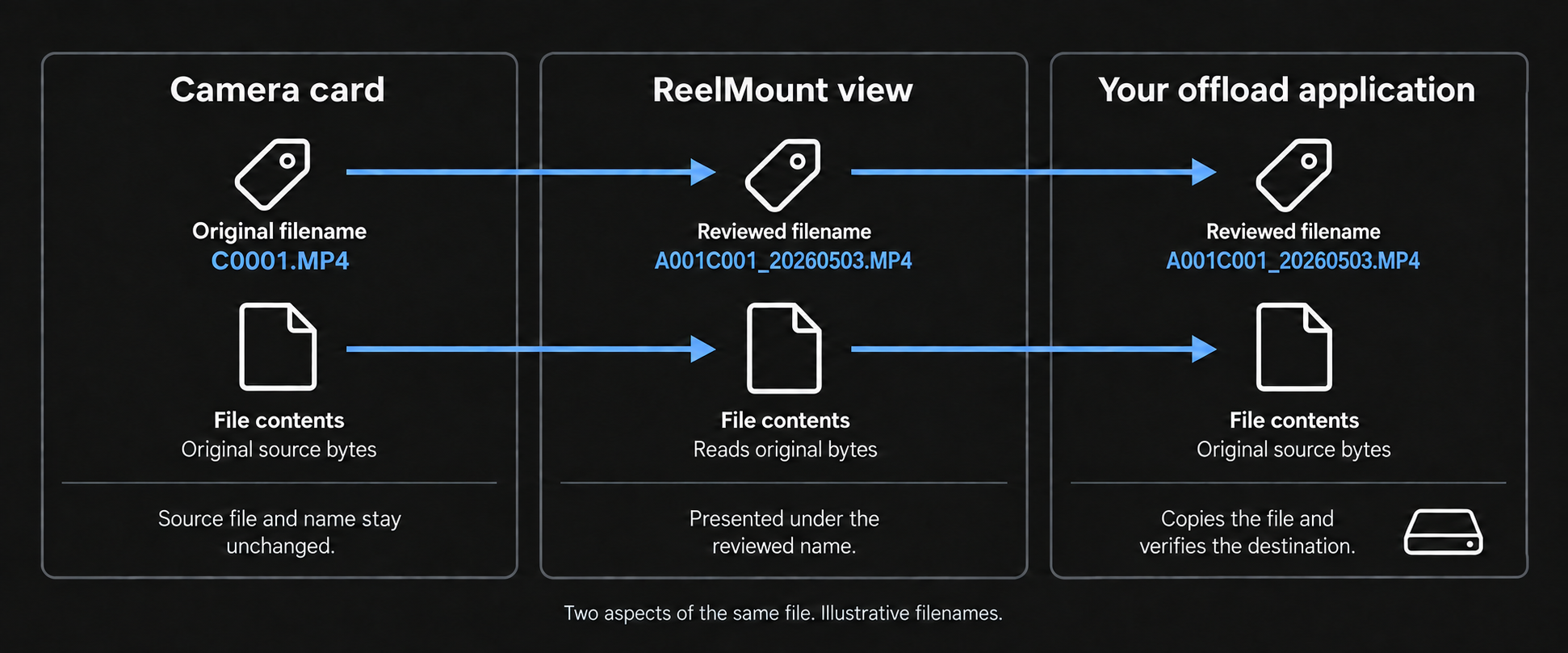
Your offload application copies and verifies the files. ReelMount provides the reviewed names and reads the original source bytes without changing them.
Pricing
ReelMount is currently in development. The plan is to make it available for free initially, as long as it is in Beta, followed by a low-cost, one-time purchase for new users. Pricing and release details will be confirmed later.
Questions & answers
Does ReelMount change anything on my camera card?
ReelMount does not rename, move, rewrite or delete your source files. It presents the names you’ve reviewed on a separate, read-only virtual volume.
Will a different filename change the checksum?
A file-content checksum is calculated from the bytes inside the file, not its name. Reading the same unchanged file directly or through ReelMount therefore produces the same checksum when using the same algorithm. A checksum report may list a different filename while showing the same content checksum.
Does ReelMount copy or verify my footage?
Your offload application handles copying and checksum verification. ReelMount supplies the reviewed filenames and access to the source bytes; it does not replace your offload application or its verification process. Therefore, you can use whatever offload application is most suitable for your project.
Could the virtual layer introduce a checksum problem?
ReelMount adds a software layer to the read path. It is designed to pass through the original file bytes without altering them.
Can I remove the card once the virtual volume is mounted?
Keep the source connected until copying and verification are finished. The virtual volume still reads from that source; it is not a backup or a stored copy of your media.
What about camera metadata and sidecar files?
ReelMount does not rewrite metadata embedded inside your media files. Names and paths presented by the virtual volume can differ, though, and some camera formats rely on particular folder structures or references between files. Compatibility needs to be checked for those workflows.
Will there be paid upgrades?
Optional paid upgrades for future major additions are being considered. Details will be confirmed as development progresses. You are welcome to submit feature requests and feedback.